 Berlinan FM-1
Berlinan FM-1
The generative Berlin School sequencer, as firmware for the M-VAVE FM-1. Short melodic loops repeat, slowly shift against each other and change only a little at a time, and you play the ensemble from the FM-1's keys, buttons and knobs. No laptop needed.
It follows the rules of the genre
The engine is Berlinan's: a style manual compiled from about 225 video lessons by a Berlin School practitioner, turned into four laws that do most of the work.
- Repetition earns change
- A pattern plays verbatim several times before it may mutate, and every mutation has to earn its place again. The dots on the Perform page count the plays left.
- One scale for everyone
- All voices share one scale. The white keys move the whole ensemble by scale degree, so it changes harmony together and never leaves the key.
- Phasing, not randomness
- Voices run loops of different lengths and drift against each other. The screen's LCM says how many bars until they line up again.
- Change on the bar
- What you press lands on the next bar line; a voice's new pattern waits for the end of its own loop. Press a little early and it still arrives in time.
It plays exactly what Berlinan for Mac plays
The engine is Berlinan for macOS's, translated into C. The same template, the same seed and the same actions at the same bars give the same notes and the same CC, event for event, tick for tick: the tests check it against the unchanged Swift engine. The Setup page shows the seed, so a run on the FM-1 can be repeated on the Mac.
Berlinan for macOS, the app it comes from, adds harmony modes, melody extraction, Ableton Link, capture and MIDI export.
Three templates to start from
Turn PRESETS to pick one; while playing it takes over at the next bar. Each starts in A minor from a fresh seed. ALGORITHM picks the mode, the Setup page the root, and the Voice page moves any voice to another channel.
Demo trio 90 BPM
Two plucks phasing 16 against 15 steps over a pulsing bass. The first piece after power-on.
- Pluck 1ch 1
- Pluck 2ch 2
- Bassch 3
Full ensemble 96 BPM
The trio grown to six: a bass melody, a chord pad, a lead and the heartbeat kick.
- Pluck 1ch 1
- Pluck 2ch 2
- Bassch 3
- Padch 4
- Leadch 5
- Heartbeatch 10
Ambient drift 72 BPM
Built on a held drone, about one change a minute, with the arranger on and two CC scenes that slowly close and open your synths' filters.
- Dronech 1
- Pluck 1ch 2
- Pluck 2ch 3
- Padch 4
It plays your synths
The FM-1 makes no sound of its own. Connect it by USB to a MIDI router (a USB MIDI host box, or a computer that passes MIDI on); it shows up as FM-Berlinan. Each voice goes out on its own MIDI channel, so every synth plays its part.
INT The FM-1 is the clock master: MIDI Start, clock and Stop over USB.
EXT It follows MIDI clock from USB or the TRS jack, and holds the tempo if the clock drops out.
SAVE The project and six snapshot slots stay through power-off.
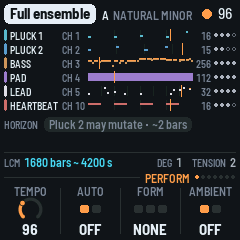
Perform: every voice's loop 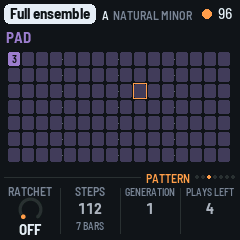
Pattern: the steps, the ratchet 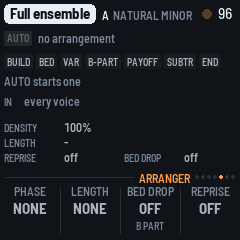
Arranger: the phases 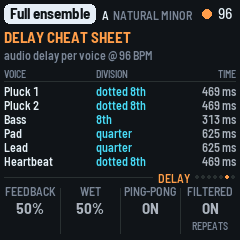
Delay: times for your effects
Made for playing live
Press PLAY and the ensemble starts at once. From there, every move is one press and lands on the next bar.
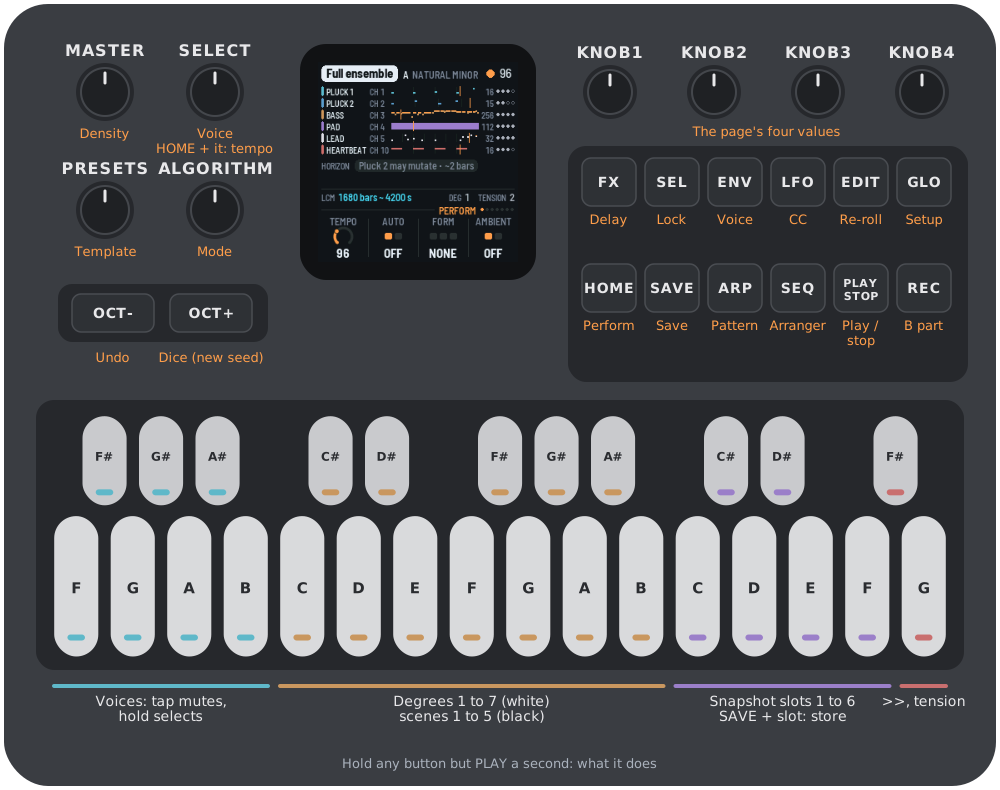
- Voice keysTap to mute, hold to select. A voice the arranger holds back comes in with a tap.
- Degree keysThe white keys move the whole ensemble to degrees 1 to 7.
- The B partREC: a contrasting second section in one press. With a voice key held: a blank cycle for that voice.
- Arranger autopilotBuilds the piece voice by voice, varies it, brings the theme back and ends it.
>>moves it on. - The density faderMASTER thins the ensemble out or fills it, from 0 to 100 %.
- Scenes and tensionThe black keys morph your synths' controllers to the template's scenes over 8 bars; G5 adds a moment of tension.
- Snapshots, Dice and undoSix slots recalled on the bar, a new seed on OCT+, 20 steps of undo on OCT-.
- Help on every buttonHold any button for a second and a card says what it does. Let go and nothing happens.
Get Berlinan for the FM-1
Install from the browser
Open the install page in Chrome or Edge, connect the FM-1 by USB and press Install; allow MIDI when the browser asks. The page checks the firmware before it writes, and the FM-1 reports its version when it restarts. Nothing is installed on the computer.
Installing firmware is at your own risk. If the FM-1 won't start, a Mac can put the stock firmware back.
Back to M-VAVE's firmware
The same page puts M-VAVE's own firmware (FM-1 V15) back: download the file from M-VAVE, choose it on the page and press the button. The page checks it is M-VAVE's before it writes. M-VAVE's own updater, M-UPGRADE, does it too.
From the command line
Download berlinan-0.5.1.fwsc, then, with fm1-base's installer from the source:
pip3 install mido python-rtmidi
python3 base/tools/fm1_install.py berlinan-0.5.1.fwsc
Build from source
Free software under the GPL 2.0 or later. The build needs Docker (or podman) and JieLi's toolchain; BUILDING.md has the details.
git clone --recursive https://github.com/jiripisa/fm1-berlinan.git
cd fm1-berlinan
./build.sh
Credits
- Berlinan for macOS and for the FM-1 by Jiří Píša, GPL-2.0-or-later.
- fm1-base by Charles Vestal (MPL-2.0): the platform, from the hardware layer, USB and storage to the update loader, this installer and the emulator.
- felucca-bsp and Felucca by Leo Kuroshita (@kurogedelic), Hügelton Instruments: the firmware fm1-base grew from.
- Berkeley SoftFloat by John R. Hauser (BSD): the engine's double-precision arithmetic, bit for bit the Mac's. The sine is FreeBSD's msun (Sun Microsystems' fdlibm).
- The screen's fonts: Barlow (SIL OFL 1.1).
M-VAVE and FM-1 are trademarks of their owners. Berlinan is not affiliated with M-VAVE or Hügelton Instruments.